.png)
Origination Review
The Origination Review feature introduces an optional control point between payment readiness and origination. When enabled, payments must be manually released before they can be included in an origination file.
This feature is designed to help you:
Review totals before origination
Confirm counts and amounts by payment file, or individual payments
Reduce errors by adding a final verification step
Release payments in bulk for efficiency
If Origination Review is not enabled for your account, your origination workflow remains unchanged.
Overview
When Manual Processing Release is enabled for a tenant, origination cannot proceed until eligible payments are explicitly released.
Payments that are ready for origination will not be originated when you build files
You must review and release payments first
Only released payments can be included in an origination file
This review step is especially useful for teams that want additional control or visibility before funds are originated.
The Origination Review section is located in Processing > Originations if the feature is enabled.
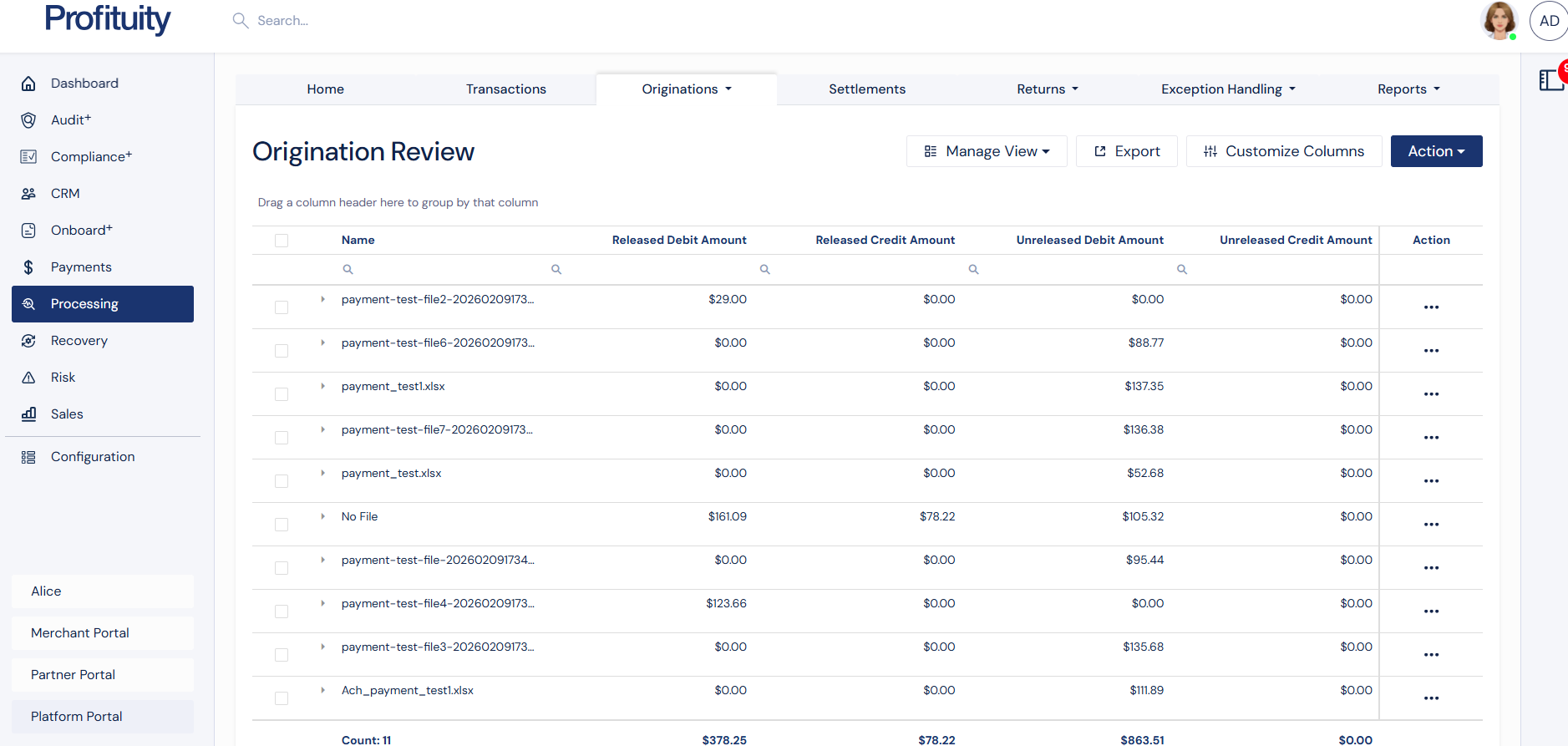
Screenshot: Origination Review
Payment File Grouping
Payments are grouped by payment file id if they have an associated file. If they do not, the payments without an id are all grouped together for ease of releasing.
What You See
A list of groups with pending payments
Aggregated totals per groups, including:
Number of payments
Debit totals
Credit totals
Net amount
Release status for each group
This view is designed to match how users typically review their activity.
Reviewing Group Totals
Each row in the list represents a release group.
From this view, you can:
Quickly scan totals across payment file groups
Identify which groups are ready to be released
Select one or multiple groups for bulk actions
This allows you to confirm that amounts and counts look correct before moving forward.
Payment Details
Clicking on a group opens a detailed view showing the individual payments that make up the totals.
From this view, you can:
See all payments included in the group
Verify individual amounts
Confirm totals match expectations
Open individual payments for further review
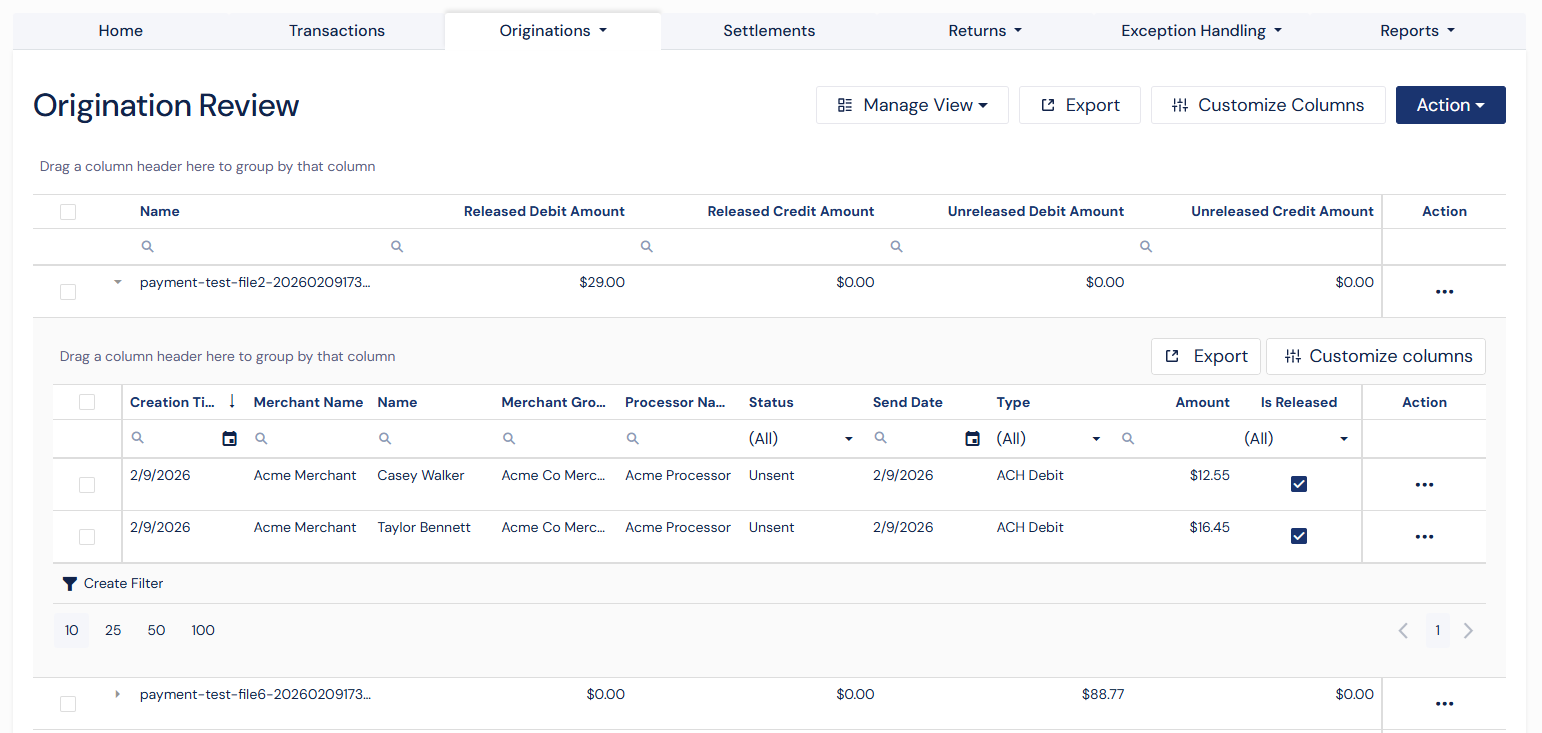
Screenshot: Origination Review Detail View
Release Actions & Workflow
Supported Actions
Users can perform the following actions:
Group-Level Actions
Release by group
Bulk release multiple groups
Unrelease a group or multiple groups prior to file build
Payment-Level Actions
Release individual payments
Bulk release selected payments
Unrelease individual or bulk payments prior to file build
How to Release Payments
Release a Single Group
From the Origination Review screen:
Select the action button for the individual group
Click Release
Confirm the action
Once released, the payments for that group are eligible for origination.
Bulk Release Multiple Groups
To release multiple groups at once:
Select multiple groups (or use Select All)
Review the combined totals
Click Release
Confirm the action
This is the recommended workflow for high-volume processing.
Tip: Bulk release is the fastest way to approve large numbers of payments.
Release a Single Payment
Individual payments can also be released from the details view.
Select the action button for the individual payment
Click Release
Confirm the action
Bulk Release Multiple Payments
To release multiple payments at once:
Select multiple payments in a detail grid (or use Select All)
Review the combined totals
Click Release
Confirm the action
Unreleasing Payments
If a payment or payment file was released by mistake, you can undo the action as long as the origination file has not yet been built.
You Can Unrelease:
An entire group
Multiple groups at once
Individual and bulk payments from the details view
Unreleased payments will return to a pending state and will not be included in origination.
What Happens After Release
Released payments become eligible for origination
Origination files will include only released payments
Payments that are not released will remain pending
Frequently Asked Questions
Do I have to use Manual Processing Release?
No. This feature is optional and must be enabled for your account.
Can I still review individual payments?
Yes. You can drill into group details and view individual payments at any time.
Can I undo a release?
Yes, as long as the origination file has not been built yet.
What if I don’t see this screen?
If you do not see Origination Review, the feature is not enabled.